Pixilart - Make Pixel Art
- 4.1
- Rating
- 1.00M
- Installs
- Free
- Price

 Analysis by App-foxy
Pixel art looks simple until I try to make something that feels deliberate. A tiny canvas leaves very little room for vague lines, accidental colors, or lazy spacing. That is why I found Pixilart interesting: its main appeal is not just drawing with square pixels, but combining pixel creation with a social space where finished work can be shared and viewed by other people. In practice, that changes the app from a private sketchpad into a place where making, checking, and presenting small digital artworks are connected.
Pixilart is a free Art & Design app from Pixilart, aimed at Teen users and available for Android devices running version 10 or later. It has reached over a million installs, with an average score of 4.2 from around ten thousand ratings. Those figures suggest a well-established community rather than a short-lived experiment, although popularity alone does not tell me whether the workflow suits every artist.
I approached it as someone who wanted to create compact illustrations on a phone rather than as a professional desktop editor. My main question was straightforward: can a social pixel-art app help me make better work, or does the community side distract from drawing? My answer is that the social element is genuinely useful when I use it as feedback and inspiration, but the app is less convincing for people who need broad illustration tools, complex editing, or a completely private workspace.
You May Also Like

 Blood Strike: 2.5 Anniversary
Blood Strike’s Loadouts Turn Every Drop Into a Tactical Gamble
A close look at Blood Strike’s custom loadouts: how fast access to signature weapons reshapes its battle royale rhythm, rewards preparation, and narrows the gap between fights.

 Pandora - Music & Podcasts
Pandora’s Music Is Easy to Start, but Harder to Recover
Pandora’s strength is its low-effort path from a seed to a station. Its weak spot is how much confidence it asks you to place in connection, setup, and quiet recovery.

 8 Ball Pool
 Is Built on Rivalries, Rematches, and Routine
A close look at the rivalries, rematches, shared routines, and unanswered safety questions that turn a quick pool match into a persistent mobile community.

 Samsung Music
’s Quiet Strength Is Playing What You Already Own
Its reach comes less from spectacle than from dependable access to a personal library. That simplicity is both the app’s strongest retention engine and its ceiling.

 AccuWeather: Weather Radar
AccuWeather Review: A Quick, Clear Forecast for Everyday Decisions
For everyday plans, the best forecast is the one you can understand quickly. AccuWeather makes rain timing, radar, and local conditions easy to act on, with a few trade-offs.

 Hill Climb Racing
Why Hill Climb Racing Still Turns Crashes Into One More Run
A tiny car, a bumpy hill and one more upgrade: Hill Climb Racing keeps resurfacing because its simple chaos makes every near-miss feel personal.
More From Our News Desk



Why the social pixel-art workflow matters
The most important capability here is the connection between pixel drawing and community sharing. Many drawing apps let me create an image and save it. Pixilart gives the activity a more public rhythm: I can work on a small piece, look at what other artists are making, and use that exposure to judge whether my own choices are readable. That matters especially with pixel art, where a single misplaced square can change an expression, silhouette, or sense of depth.
I do not see the community as a replacement for the canvas. The drawing still has to work on its own. What the social layer adds is a reason to finish small experiments instead of leaving them as half-made files in a gallery. I found that useful when testing limited palettes, character poses, or tiny background scenes. Seeing pixel art presented as completed work also made me think more carefully about edges and contrast before calling a piece finished.
This capability is particularly valuable for beginners because pixel art has a visible learning curve. A conventional brush can hide uncertain decisions under soft strokes, while a pixel canvas exposes every choice. Browsing other work can help me notice practical ideas: how a darker outline separates a figure from its background, how a few shades suggest lighting, or how a simple cluster of pixels communicates texture. The app becomes a learning environment through observation, not merely a place to press a share button.
There is also a motivational effect. A large illustration can feel too ambitious on a phone, but a small pixel scene is easier to start and complete. I can focus on one object, one character, or one mood. The social setting gives that small project a sense of destination. The strongest reason to use Pixilart is that it turns tiny creative exercises into shareable, visible work.
What the app feels like while creating
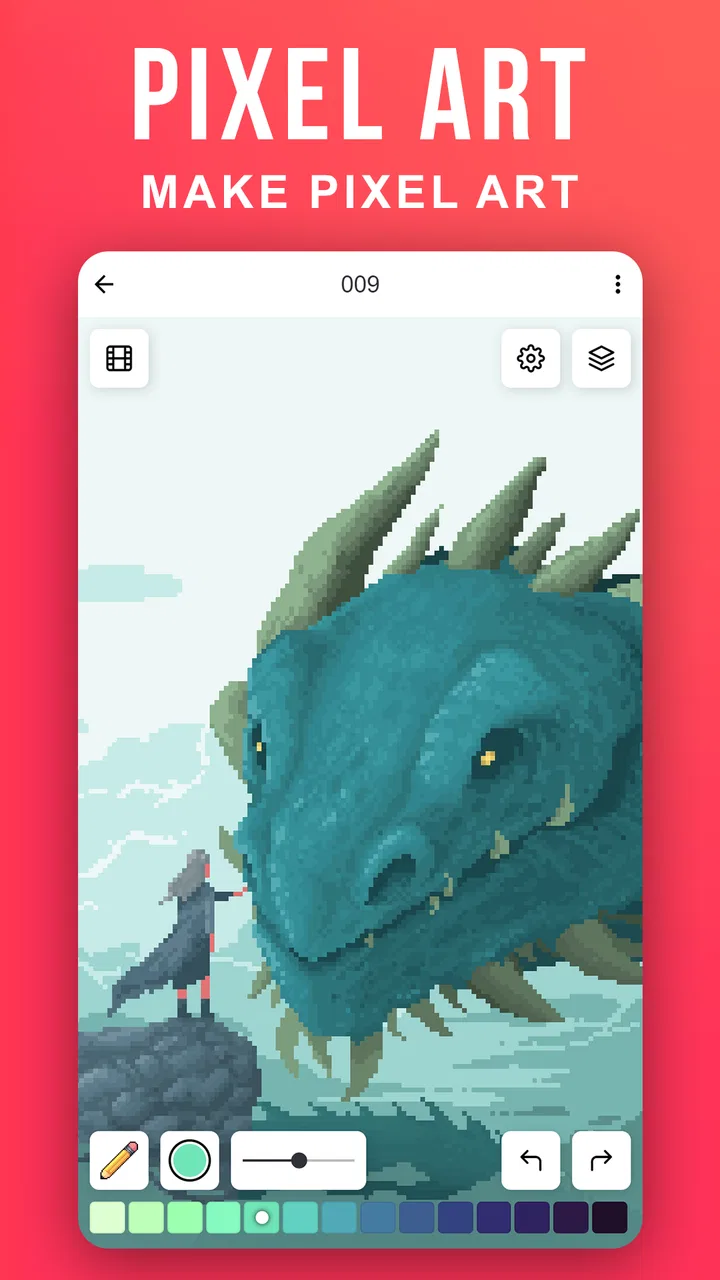
In use, I think of Pixilart as a focused pixel workspace rather than a general-purpose painting studio. The appeal comes from working at a small visual scale, where careful placement matters more than expressive brush movement. That makes it comfortable for icons, sprites, simple characters, decorative patterns, and compact scenes. It is also approachable for someone who has never used a full desktop pixel editor and does not want to begin with a crowded professional interface.
The small-scale approach changes how I plan an image. Instead of trying to draw details immediately, I first decide what the silhouette needs to communicate. A character should remain recognizable even before I add highlights. A tree should have a clear shape before I worry about individual leaves. This is a useful discipline, and the app encourages it simply because pixel art does not offer much space for unnecessary decoration.
I also found that the social context affects color decisions. When I expect another person to see the finished image, I am less likely to add random shades just because they are available. I start thinking in groups: a base color, a shadow, a highlight, and perhaps one accent. That restraint is one of the best lessons the app can provide, although it depends on my willingness to study and revise rather than merely scroll through other creations.
How I would use it in a normal day
A realistic example would be a short commute or a quiet break after work. I might open Pixilart with an idea for a tiny room scene. Rather than attempting a full illustration, I would block the wall, floor, window, and one central object. Then I would inspect the image at its normal viewing size and remove details that do not improve recognition. If the result feels coherent, I could share it and compare it with other pixel-art approaches later.
This kind of session works because it has a natural stopping point. I am not committing to a long drawing appointment. I can make one design decision at a time: the direction of the light, the shape of the furniture, or the contrast between the subject and the background. For a beginner, that makes practice less intimidating. For an experienced pixel artist, it can be a convenient way to generate thumbnails or visual prompts away from a computer.
The same workflow can support a personal challenge. I might create several versions of one object using different palettes, or redraw the same character with a clearer silhouette. The social side then becomes a place to show progression rather than only polished results. That is a more useful habit than chasing attention, because the comparison is between my own attempts and not just between my work and highly finished pieces from other users.
Practical habits that improve the results
My first tip is to begin with a strict color plan. Pixel art becomes muddy when every small area receives a separate color. I would choose the dominant color, one darker family for shadows, one lighter family for highlights, and a contrasting accent only when the image needs it. This makes the final piece easier to read and gives the community something specific to react to.
My second tip is to inspect the image at two scales. Zooming in helps me place individual pixels, but it can also make weak shapes look more impressive than they really are. I need to step back and ask whether the subject is readable at a glance. If the answer is no, adding more tiny details usually will not solve the problem. A cleaner silhouette often does more than another layer of texture.
My third tip is to use the social feed as a study tool rather than a source of pressure. I would save mental notes about how other artists handle outlines, light, and empty space, then apply one idea to my own work. Copying an entire style would make the exercise less useful. The better approach is to isolate a decision, such as using a darker color only where forms overlap, and test that decision in a new image.
A fourth useful habit is to finish deliberately. Before sharing, I would check for isolated pixels, uneven edges, accidental gaps, and details that compete with the main subject. These mistakes are easy to miss while working close to the canvas. A final inspection is especially important when the artwork is small, because viewers have fewer visual clues to interpret.
Where Pixilart fits beside other art apps
Compared with a general mobile drawing application, Pixilart is more specialized and more focused. A broad painting app is usually the better choice when I want fluid strokes, textured brushes, soft blending, or a large canvas. Those tools are useful for concept art, handwriting, painting studies, and expressive sketches. Pixilart makes more sense when the square-pixel look is part of the goal rather than an accidental limitation.
Compared with a desktop pixel editor, the app is more approachable for quick practice and community participation. A computer-based tool may offer a deeper production workflow, especially for artists who need precise file management, extensive editing controls, or a large-screen view of every frame and layer. I would choose that route for a serious asset pipeline or a long project requiring maximum control. Pixilart is better suited to learning, experimenting, and sharing compact pieces without turning every session into a technical task.
It also differs from a private notes or gallery app because the work is connected to an audience. That can encourage consistency, but it can also change the reason I create. If I am easily distracted by reactions or by comparing my early attempts with advanced community work, a private editor may be healthier. Pixilart rewards users who can treat public sharing as part of practice rather than as a test of personal worth.
The tradeoffs I noticed
The first limitation is the phone screen itself. Pixel-level work demands precision, and a small display can make detailed editing tiring. I sometimes have to move between a close view for placement and a broader view for composition. That is manageable for small pieces, but it becomes less comfortable as the artwork grows in complexity. Anyone who dislikes frequent zooming or careful tapping may find the process slower than expected.
The second tradeoff comes from the app’s social identity. Community access is a strength, but it can make the experience feel busier than a silent drawing tool. Inspiration is useful when I have a clear goal. Without one, browsing can replace making. I would recommend opening the app with a specific exercise in mind, such as a limited-palette object or a character silhouette, rather than relying on endless discovery to produce motivation.
The third issue is that pixel art rewards patience more than speed. A casual user may expect a quick doodle to look finished immediately, but strong results usually require editing individual areas and checking the image at normal size. Pixilart makes that style accessible; it does not remove the craft involved. People looking for automatic polish or effortless visual effects should choose a different kind of art app.
There is also a difference between sharing and professional delivery. I would use Pixilart confidently for studies, personal projects, community feedback, and early visual ideas. I would be more cautious about treating it as my only tool for client-ready illustration or a large commercial workflow. The app’s greatest value is its focused creative loop, not replacing every other part of an artist’s toolkit.
Who will get the most from it
Pixilart is a strong match for beginners who want a friendly entry into pixel art and for artists who enjoy learning by looking at other people’s work. It also suits hobbyists who prefer short, achievable projects, students exploring digital design, and creators who want to build a habit around making small images. The free price lowers the barrier to trying that workflow, while the Teen content rating makes it important for younger users and families to keep the intended audience in mind.
It can also help someone who feels stuck with larger canvases. Starting with a tiny scene forces a decision about what matters most. That constraint can make composition easier to understand. I would suggest it to a friend who wants to practice shape language, contrast, and visual storytelling without first learning a complicated professional package.
I would not make it my first recommendation for someone seeking realistic painting, advanced photo manipulation, soft brushwork, or a private archive with no community component. It is also not ideal for a user who expects every drawing session to be fast. Pixel art is simple in appearance but exacting in execution, and the app’s social side works best when the user is comfortable sharing or at least observing within a creative community.
The current version is 1.9.0, and the app was released on November 5, 2018, so it has had time to establish its identity around pixel creation and social interaction. I would still judge it by the way I plan to work: quick mobile studies and community learning point toward Pixilart, while complex production work points toward a more expansive editor.
My recommendation after using it
I recommend Pixilart to anyone who wants pixel art to feel like a repeatable practice rather than a one-off experiment. Its defining strength is the link between making a small image and placing that image in a community context. That connection can improve discipline, expose me to useful visual decisions, and make modest projects feel worth completing.
My advice is to approach it with a narrow goal. Make one object, one character, or one scene. Limit the palette, check the silhouette at normal size, and use other artists’ work as a source of techniques rather than comparison. If that sounds enjoyable, the app offers a focused and approachable way to grow. If I wanted a full painting studio or a strictly private workspace, I would choose another tool instead.
For me, the best part is not simply that I can draw pixels on a phone. It is that the app encourages me to think about why each pixel is there and what happens when another person sees the finished result. That makes Pixilart a worthwhile choice for deliberate, social, small-scale art—provided I accept its narrow focus and give the craft the patience it deserves.
FAQs for Pixilart - Make Pixel Art
01What is Pixilart and how does it work?
Pixilart is a digital platform designed for creating pixel art. It offers various tools like brushes, layers, and grids that help users design detailed pixel graphics. Whether you're a beginner or an experienced artist, Pixilart provides an intuitive interface to create, share, and explore pixel art projects seamlessly.
02Is Pixilart free to use, and are there any in-app purchases?
Pixilart is free to use, offering a robust set of tools for creating pixel art. However, it may include optional in-app purchases that provide additional features or remove ads. These purchases are not mandatory but can enhance your experience if you choose to explore them.
03Can I use Pixilart offline, or do I need an internet connection?
Pixilart primarily requires an internet connection as it is a web-based platform. The online community features, such as sharing your creations and interacting with other artists, are accessible only with internet connectivity. However, the mobile app may offer limited offline functionality for basic drawing tasks.
04What kind of community features does Pixilart offer?
Pixilart boasts a vibrant community where users can share their artwork, receive feedback, and engage with other artists. The platform allows users to join challenges, participate in forums, and explore a gallery of projects from around the world, fostering a collaborative and inspiring environment.
05Is Pixilart suitable for beginners, or is it more for advanced users?
Pixilart is suitable for users of all skill levels. It provides beginner-friendly tutorials and an intuitive interface, making it easy for newcomers to start creating pixel art. At the same time, it offers advanced features like layers and custom brushes, catering to more experienced artists seeking detailed control over their creations.
Pros
- Intuitive interface for beginners
- Vast library of colors and tools
- Active community sharing artwork
- Supports animation frame creation
- Free with optional premium features
Cons
- Ads can be intrusive at times
- Limited offline functionality
- Occasional app crashes
- Advanced features need subscription
- Smaller canvas size restrictions

Pixilart - Make Pixel Art
Gallery